Salt Lake City Public Library
- 4.5
- Rating
- 10.00K
- Installs
- Free
- Price

 Analysis by App-foxy
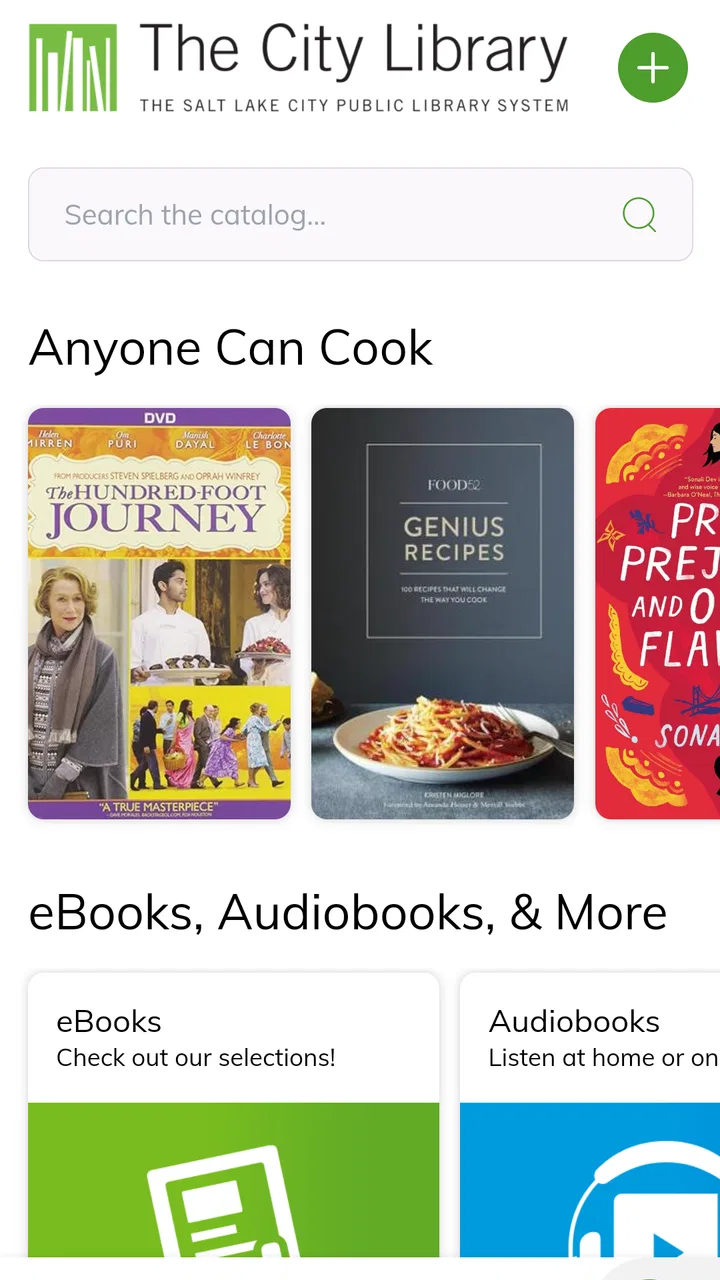
When a household relies on one library account, one tablet, or simply one shared reading list, small points of friction matter. I tested Salt Lake City Public Library’s app with that kind of everyday use in mind, and I found its main value in bringing The City Library’s catalog and Digital Library into a single mobile starting point. It is a free Android app from Salt Lake City Public Library, aimed at browsing rather than entertainment or social interaction, and it makes the most sense for people who already use that library system.
The app sits in the Libraries & Demo category, but that label understates its practical role. I would describe it as a pocket catalog for checking what is available, discovering something new, and moving from a vague request such as “find me a mystery” toward a specific library item. Its average rating is 4.5 from around 59 ratings, with around 26 written reviews, and more than 10K installs. Those figures suggest a modest but established audience rather than a huge general-purpose reading platform.
How it works in a shared household
The most convincing use case is a family or household that shares access to The City Library while each person has different interests. One person may be looking for a children’s audiobook, another may want a cookbook, and someone else may need a novel for a weekend trip. Instead of opening a browser and searching from scratch, I can use the app as the first place to explore the catalog and Digital Library.
You May Also Like

 AccuWeather: Weather Radar
AccuWeather Review: A Quick, Clear Forecast for Everyday Decisions
For everyday plans, the best forecast is the one you can understand quickly. AccuWeather makes rain timing, radar, and local conditions easy to act on, with a few trade-offs.

 Hill Climb Racing
Why Hill Climb Racing Still Turns Crashes Into One More Run
A tiny car, a bumpy hill and one more upgrade: Hill Climb Racing keeps resurfacing because its simple chaos makes every near-miss feel personal.

 AliExpress - Shopping App
AliExpress Makes Global Shopping Feel Personal, but Shoppers Bear the Risk
AliExpress turns a global marketplace into a pocket-sized discovery engine. Its reach is useful, its shopping loop compelling, and its trade-offs easy to miss.

 Lords Mobile: Kingdom Wars
Lords Mobile Is a Kingdom-Building Routine, Not a Quick Match
A case-by-case verdict on the building, battles, device demands, and social commitments that make Lords Mobile rewarding for some players and exhausting for others.

 PDF Scanner app - TapScanner
TapScanner Makes Paperwork Easier to Capture, Check, and Share
TapScanner makes scanning with a phone feel less like a rescue operation and more like a dependable step in getting work done. Its capture tools are useful, though not flawless.

 Block Blast!
 Shows How Much a Puzzle Game Can Leave Out
A quiet grid game shows why puzzle players increasingly value instant clarity, repeatable skill and low-pressure play—and where the genre still needs to catch up.
More From Our News Desk
View All News


A realistic scenario is a parent waiting outside school while a child remembers a book they need. The parent can search immediately, inspect the available result, and decide whether it is worth pursuing. Later, another household member can repeat the process for an entirely different subject. That is a small convenience, but it is exactly the sort of convenience a library app should provide: reducing the distance between a question and the library’s collection.
On a shared device, I would keep expectations practical. This is not a household planner, messaging tool, or family media dashboard. Its job is to help people browse library resources. Coordination still happens through ordinary household habits: telling someone which title you found, writing down a call number or title, or handing over the device. The app supports the discovery step, but it does not replace communication between users.
That boundary is useful because it prevents a common mistake. A family should not treat the app as though it automatically understands who is searching or why. If several people use the same phone, recent searches or browsing context may be visible to the next person. I would therefore avoid assuming that a shared device creates separate personal spaces. For private reading interests, using an individual device is the cleaner approach.
Starting with the right library question
I get better results when I begin with a concrete need rather than browsing aimlessly. A title, author, subject, or format gives the catalog a clear direction. If I am helping a child, I first ask whether they want a physical book or a digital item, because the Digital Library is part of the app’s purpose and may lead to a different kind of result than the regular catalog.
For a household, this distinction is more important than it sounds. Someone asking for “the book” may mean a printed copy, while another person may expect something available to read or listen to digitally. I would repeat the format aloud before making a decision. That simple habit prevents wasted time and makes the app more useful when several people are coordinating one request.
Browsing is also a good fit for those moments when nobody has a definite title in mind. I can use the catalog to move from a broad interest to a shortlist, then discuss the options with the rest of the household. The app is less valuable if I expect it to make the recommendation for me. It exposes the library’s collection; the human choice still happens afterward.
Setup, account boundaries, and everyday coordination
Installation is straightforward for compatible Android devices. The app requires Android 6.0 or later, so it remains accessible on many older phones and tablets. Its current version is 2026.01.14, which shows that the application continues to receive version updates. I appreciate that the entry cost is simple: it is free, with an Everyone content rating, so there is no purchase decision to make before trying it.
That does not mean every household setup is identical. The important question is not only whether the app installs, but who will use it and on which device. A personal phone is easier for an individual library member. A shared tablet may be more convenient for a family, but it also means that searches and any account-related activity need to be handled with care. I would decide this before inviting children or other relatives to browse independently.
Account boundaries deserve particular attention. A library app can be used by different people in the same home, but that does not automatically mean they have separate profiles inside the app. I would not assume that a child’s activity, an adult’s activity, or a guest’s activity is isolated merely because the device has multiple users. If the app asks for library credentials during a borrowing or digital-access step, the person entering them should understand whose account is being used.
For that reason, I prefer a simple household rule: browse together on a shared device, but handle personal account actions on the appropriate person’s device or session. This is especially sensible when an adult is helping a child. The adult can search and explain the result without casually leaving personal account information available for the next user.
Another useful boundary is separating discovery from commitment. I can search for a title without immediately deciding that it is the right choice for everyone. In a family setting, I would first create a short mental or written list, then check the details again before someone relies on the result. This avoids the familiar problem of one person saying “I found it” when they actually found a related edition or a digital alternative.
Coordinating several readers without overcomplicating it
The app works best as a shared reference point. If two people are choosing books, I would have one person search while the other says what they need: subject, author, age suitability, or format. That turns a passive browsing session into a quick conversation. It is faster than passing a device back and forth without a plan.
For errands, I would search before leaving home and note the exact title and author. That gives the person visiting the library a clearer target than a general request such as “bring back something about space.” If the first choice is unsuitable, the second person can return to the app and search again rather than relying on memory.
For digital materials, coordination can be slightly different. A household may share a tablet for reading or listening, while adults and children have separate preferences. I would agree on who is using the device and when, especially if the same screen is also used for schoolwork. The app can help locate the material, but it does not solve the household’s scheduling problem.
One of my favorite practical uses is helping someone who is not comfortable searching library catalogs. An older relative may know the author but not the exact title. A teenager may know the topic but not the right library vocabulary. I can sit beside them, translate their request into a search, and let them make the final choice. That makes the app useful as an accessibility aid in the broad everyday sense, even though I would not describe it as a specialized accessibility product.
Age context and trust
The Everyone rating makes the app suitable as a general library-browsing tool for a broad audience. That is helpful in a home with children because the basic activity—looking through library resources—is naturally family-friendly. Still, an age rating should not be confused with a promise that every catalog result will suit every child. A library collection covers many interests and reading levels, so adults should remain involved when younger users are searching independently.
I would give children room to explore, but I would also teach them to check the title, author, and format before choosing. This is a better lesson than simply handing over the device and expecting the search result to do all the thinking. For younger readers, an adult can use the app to offer two or three suitable choices, then let the child select one. That keeps the experience manageable without pretending the app is a parental-control system.
Trust also matters when a shared device is used by guests. If a visiting relative wants to browse, I would let them search without exposing personal account details. If the app is connected to an individual library account, I would make sure the guest is not accidentally using that account for actions intended for someone else. The safest household approach is clear permission: who is browsing, whose account is active, and what the person is allowed to do.
For teenagers, the app can support more independent library habits. They can search for school topics, fiction, or digital resources and then discuss the result with an adult when necessary. I would still encourage them to verify that the item matches the assignment or intended format. A catalog search is a starting point, not a substitute for checking requirements.
Where it beats ordinary alternatives—and where it does not
The obvious alternative is using a mobile browser to reach the library website. A browser may be better when I need broad web information, opening several unrelated pages, or working on a desktop. The dedicated app is more focused: I open it with the expectation that I am going to browse the catalog or Digital Library. That narrower purpose is its strength when I am already thinking about library materials.
Compared with a general reading app, it also has a different relationship with ownership and discovery. A commercial reading service may be better for a large personal collection, recommendations across many providers, or reading tools unrelated to one local library. This app is better when my question is specifically, “What can I find through The City Library?” Choosing between them depends on whether I value local library access or a broad private reading ecosystem.
It is also not a replacement for visiting library staff when the search becomes complicated. If I need help choosing an age-appropriate series, locating a specialized subject, or understanding why a result is not the format I expected, a librarian can provide judgment that a catalog interface cannot. I see the app as a way to prepare a better question before asking for help, not as a reason to avoid human assistance.
The main friction is that the app’s usefulness depends on the library system behind it and on the user understanding the difference between catalog browsing and digital access. Someone outside Salt Lake City or someone who wants a universal book database will probably get more value from a broader service. Likewise, users who only want a polished e-reader may find the app too focused on discovery and library access rather than long reading sessions.
I would also skip it if I rarely use libraries and do not expect to search The City Library’s resources. Free installation is not a reason by itself to keep an app. Its value comes from a specific connection to Salt Lake City Public Library, so people without that connection should choose a tool that serves their actual reading habits.
Small habits that make the app more useful
My first tip is to search with one identifying detail at a time. Start with the author or distinctive part of the title, then refine the choice by format or subject. This is usually less confusing than entering a long natural-language request and hoping the catalog interprets it exactly as intended.
My second tip is to treat every result as something to inspect, not merely tap. Confirm the title and author before telling another household member that the item is available. This matters when several editions, related works, or digital and physical versions appear close together.
My third tip is to use a shared browsing session for decisions, not for personal account management. Let children or relatives participate in choosing, but keep credentials and account-specific actions with the person who owns the account. This creates a clearer boundary without requiring complicated household rules.
My fourth tip is to search before a planned library visit. Even a brief check can turn an unfocused trip into a targeted one. If the first idea does not work, search for an author, subject, or alternate format while the request is still fresh. The app is particularly helpful when the household has limited time and wants to arrive with a few realistic options.
Finally, I would use the app as a conversation tool. Ask a child why they chose a result, ask a partner whether digital access is acceptable, or ask an older relative which author they remember. The strongest experience is not silent scrolling; it is using the catalog to make library decisions together.
My household verdict
Salt Lake City Public Library’s app is a focused, sensible tool for people who want mobile access to The City Library’s catalog and Digital Library. I like it most as a discovery and coordination aid: it helps a household turn reading requests into searchable options, and it gives individuals a convenient way to begin from their own phone or tablet.
Its free price and Everyone rating make trying it easy, while compatibility with Android 6.0 or later keeps the technical barrier fairly low. The developer, Salt Lake City Public Library, has made the app’s purpose clear through its focus on local library resources rather than unrelated extras. With a 4.5 average and more than 10K installs, it has enough visible adoption to feel like a practical library companion rather than an experiment.
I would recommend it to Salt Lake City library users, families coordinating different reading needs, students starting a research search, and anyone who often asks whether a particular title is available through the local library. I would be more cautious for people looking for a universal catalog, a dedicated reading environment, or sophisticated separation between multiple household accounts.
My final advice is to install it with a specific purpose: search for a title, explore a subject, or compare physical and digital possibilities. Use shared devices openly, keep account boundaries clear, and involve younger readers in the choice rather than assuming the app can make suitability decisions for you. The real strength is its direct connection to local library discovery, and when that is exactly what your household needs, the simplicity becomes an advantage.
FAQs for Salt Lake City Public Library
01What features does the Salt Lake City Public Library app offer?
The Salt Lake City Public Library app provides a range of features including access to the library catalog, e-book and audiobook downloads, event calendars, and account management tools. Users can also place holds on items, renew checkouts, and receive notifications about due dates and upcoming events.
02Is the app free to use, and do I need a library card?
Yes, the app is completely free to download and use. However, to access certain features like borrowing e-books or placing holds, you will need a library card from the Salt Lake City Public Library. Signing up for a library card is straightforward and can often be done online.
03Can I access digital resources like e-books and audiobooks using the app?
Absolutely! The Salt Lake City Public Library app allows users to browse and borrow a vast selection of e-books and audiobooks. These can be downloaded directly to your device for offline reading or listening, making it convenient to enjoy your favorite titles anywhere.
04Does the app provide information about library events and programs?
Yes, the app includes an events calendar that keeps you informed about upcoming programs, workshops, and events at the library. You can easily browse through listings, find details about each event, and even add them to your personal calendar with a simple tap.
05How user-friendly is the app for managing my library account?
The app is designed to be very user-friendly, offering seamless account management features. You can check your account status, view checked-out items, renew materials, and manage holds directly from the app. Notifications and reminders help keep you up-to-date with your library activities.
Pros
- User-friendly interface for easy navigation.
- Extensive digital book collection available.
- Free access to premium resources.
- Seamless integration with library accounts.
- Regular updates with new features.
Cons
- Limited offline access to digital materials.
- Occasional app crashes reported by users.
- Requires a library card for full access.
- Some features need internet connection.
- Limited language support in app settings.

Salt Lake City Public Library
Gallery